

Originally posted at the Oracle University Learning Community
How often do our eyes betray us, and we end up tricked? This is one of the scenarios where that happens.
Let’s set the stage: you created a load balancer with all the required infrastructure (VNC, subnets, security lists, and all the good stuff). The web server is not part of your duties but to validate your work, so you quickly provision an Oracle Linux instance with Apache in the backend set.
After waiting a couple of minutes, the health check does not turn green, and you wonder what could be wrong. Nothing is wrong on the network level, with everything working as it should. You access the web server using your browser, and the test page shows up promptly.
I saw this issue countless times, haunting OCI admins of all levels and consuming precious time.
As a refresher, here is the default health check in a backend set:
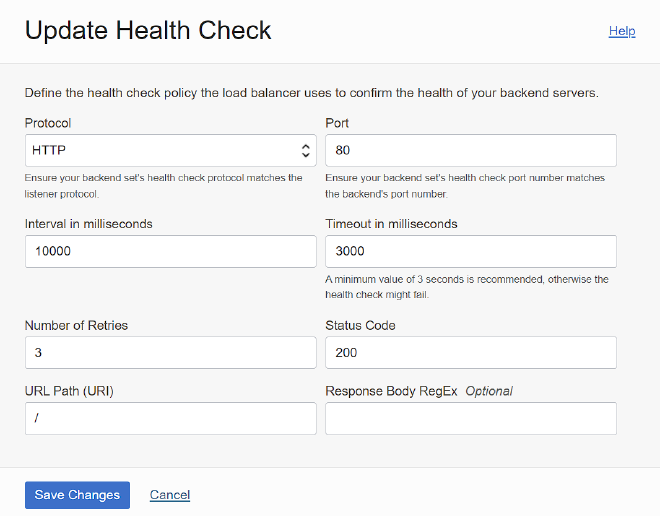
It will try to fetch a page at the Root of the web server, which should return an HTTP/200 code to be marked as healthy. You can see the test page, but it makes no sense. That’s where the tricky part is: if you inspect the response of the web server, you will see that despite showing the test page and it looks like a simple page; the return code is HTTP/403, as you can see below:
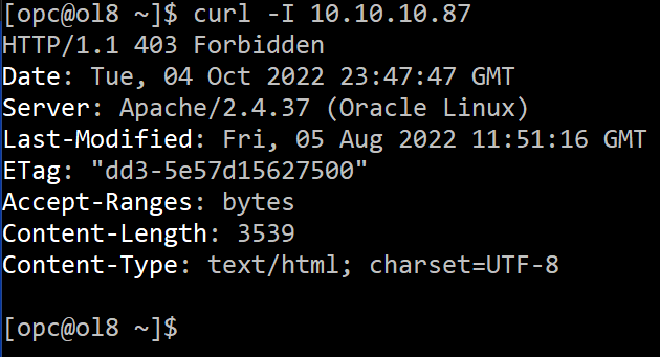
I checked using curl, but you can check using the web developer tools from your browser.
To avoid that behavior, you can create a simple page (it will return HTTP/200) or change the parameters of the health check.
Have you faced a similar problem to what I described in this tip? How did you solve it? I hope this tip can save you some time when you are troubleshooting issues in the future.